实验室版 API
实验室版提供ECGFounder、文本生成单导联、单导联生成十二导联、三导联生成十二导联、PPG信号生成单导联以及单导联生成心脏超声的核心能力。
注意事项
🔬 欢迎使用实验室 API!
目前所有接口均处于公测阶段,功能可能会不定期调整。
为确保正常访问和数据安全,请进入 科研合作页面 联系工作人员获取专属访问密钥。
💡 温馨提示:请妥善保管您的密钥,避免泄露或滥用。
适用场景
- 医学研究
- 心电模型验证
MCMA接口
POST /api/v1/experimental/mcma
通过输入单导联信号可以生成十二导联信号。
请求参数
| 参数 | 类型 | 必填 | 说明 |
|---|---|---|---|
| ecgData | array | ✅ | ECG信号数据数组(ADC值) |
| ecgSamplerate | number | ✅ | 采样率,单位Hz(推荐250-500) |
| original | boolean | ❌ | 是否输出原始波形,默认true |
请求示例
curl -X POST "https://api.heartvoice.com.cn/api/v1/experimental/mcma" \
  -H "Authorization: Bearer YOUR_API_KEY" \
  -H "Content-Type: application/json" \
  -d '{
    "ecgData": [512, 515, 520, 518, 525, ...],
    "ecgSampleRate": 500
  }'
响应示例
{
  "errorCode": "0",
  "msg": "成功",
  "data": [
    [
      -0.0005600000149570405,
      0.05680999904870987,
      -0.002580000087618828,
      0.02824000082910061,
      ...
      ]
    ]
}
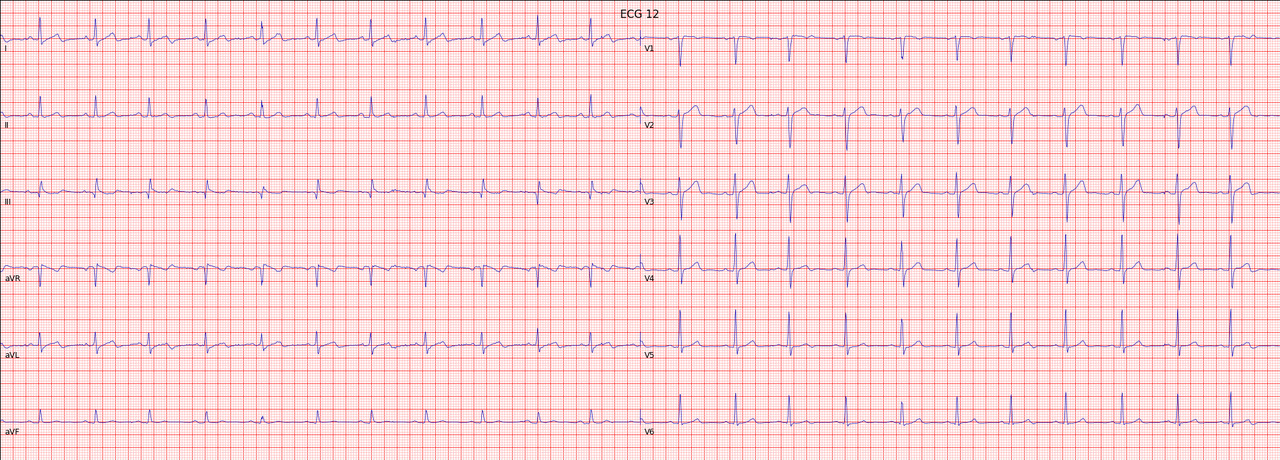
可视化展示
import ecg_plot
ecg_plot.plot(gen_ecg12, sample_rate=fs, title='ECG 12')
ecg_plot.show()
文献
@article{chen2024multi,
  title={Multi-channel masked autoencoder and comprehensive evaluations for reconstructing 12-lead ECG from arbitrary single-lead ECG},
  author={Chen, Jiarong and Wu, Wanqing and Liu, Tong and Hong, Shenda},
  journal={npj Cardiovascular Health},
  volume={1},
  number={1},
  pages={34},
  year={2024},
  publisher={Nature Publishing Group UK London}
}
Chen, J., Wu, W., Liu, T., & Hong, S. (2024). Multi-channel masked autoencoder and comprehensive evaluations for reconstructing 12-lead ECG from arbitrary single-lead ECG. npj Cardiovascular Health, 1(1), 34.
DiffuSETS接口
POST /api/v1/experimental/diffuSets
通过输入单导联信号可以生成十二导联信号。
请求参数
| 参数 | 类型 | 必填 | 说明 |
|---|---|---|---|
| text | str | ✅ | 临床诊断文本,多个诊断需要用'|'分隔开 |
| age | int | ✅ | 年龄 |
| sex | str | ✅ | 性别 |
| hr | int | ✅ | 心率 |
| batch | int | ❌ | 选择生成ECG的数量 |
请求示例
curl -X POST "https://api.heartvoice.com.cn/api/v1/experimental/diffuSets" \
  -H "Authorization: Bearer YOUR_API_KEY" \
  -H "Content-Type: application/json" \
  -d '{
    "text": 'Sinus rhythm|Normal ECG.',  # Clinical text report, multi-reports should be split by '|'
    "age": 50,  # Age of patient
    "sex": 'M',
    "hr": 80,
    'batch': 1
  }'
响应示例
{
  "errorCode": "0",
  "msg": "成功",
  "data": {
    "textImg": "[\"iVBORw0KGgoAAAANSUhI=...\"]"
  }
}
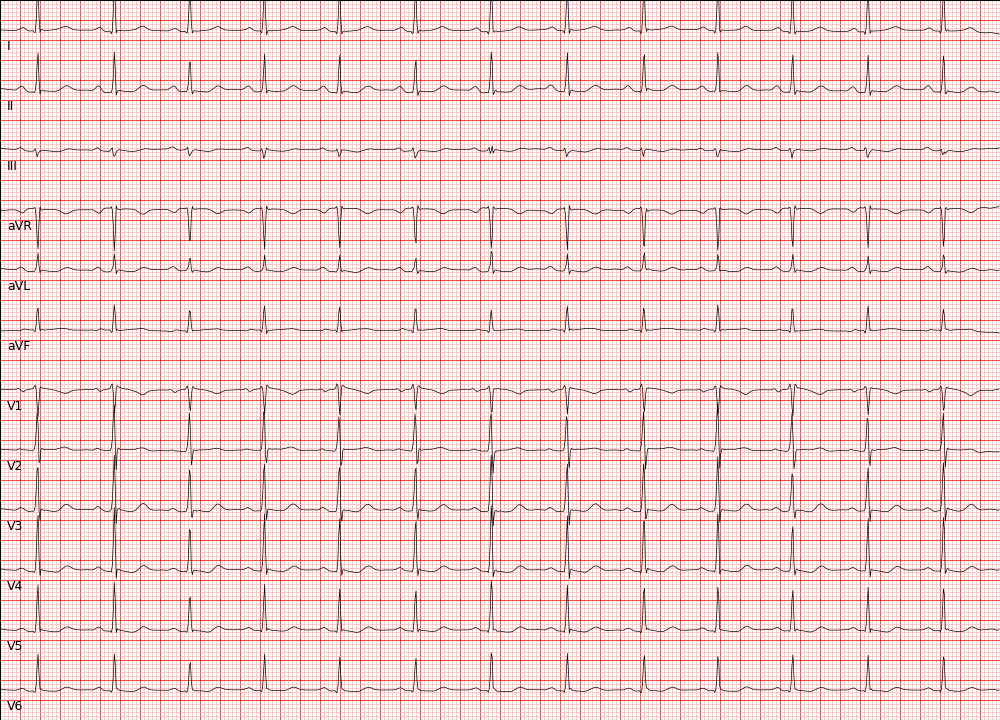
可视化展示
import time
import requests
import json
import base64
import io
from PIL import Image

def base64_to_image(base64_str):
    # 解码Base64字符串
    image_data = base64.b64decode(base64_str)
    # 使用io.BytesIO将解码后的数据转换为文件对象
    image_file = io.BytesIO(image_data)
    # 使用PIL打开图片
    image = Image.open(image_file)
    return image

ecg_img = base64_to_image(ecg_data)
ecg_img.show()
文献
@article{lai2025diffusets,
  title={DiffuSETS: 12-Lead ECG generation conditioned on clinical text reports and patient-specific information},
  author={Lai, Yongfan and Chen, Jiabo and Zhao, Qinghao and Zhang, Deyun and Wang, Yue and Geng, Shijia and Li, Hongyan and Hong, Shenda},
  journal={Patterns},
  year={2025},
  publisher={Elsevier}
}
Lai, Y., Chen, J., Zhao, Q., Zhang, D., Wang, Y., Geng, S., ... & Hong, S. (2025). DiffuSETS: 12-Lead ECG generation conditioned on clinical text reports and patient-specific information. Patterns.
WearECG接口
POST /api/v1/experimental/lead3Lead12
通过输入单导联信号可以生成十二导联信号。
请求参数
| 参数 | 类型 | 必填 | 说明 |
|---|---|---|---|
| ecgData | array | ✅ | ECG信号数据数组(ADC值) |
| ecgSampleRate | number | ✅ | 采样率,单位Hz(推荐250-500) |
请求示例
curl -X POST "https://api.heartvoice.com.cn/api/v1/experimental/lead3Lead12" \
  -H "Authorization: Bearer YOUR_API_KEY" \
  -H "Content-Type: application/json" \
  -d '{
    "ecgData": [[512, 515, 520, 518, 525, ...],[512, 515, 520, 518, 525, ...],[512, 515, 520, 518, 525, ...]],
    "ecgSampleRate": 500
  }'
响应示例
{
  "errorCode": "0",
  "msg": "成功",
  "data": [
    [
      -0.0025084596127271652,
      0.0118071788037084,
      0.014166647854523678,
      ...
      ]
    ]
}
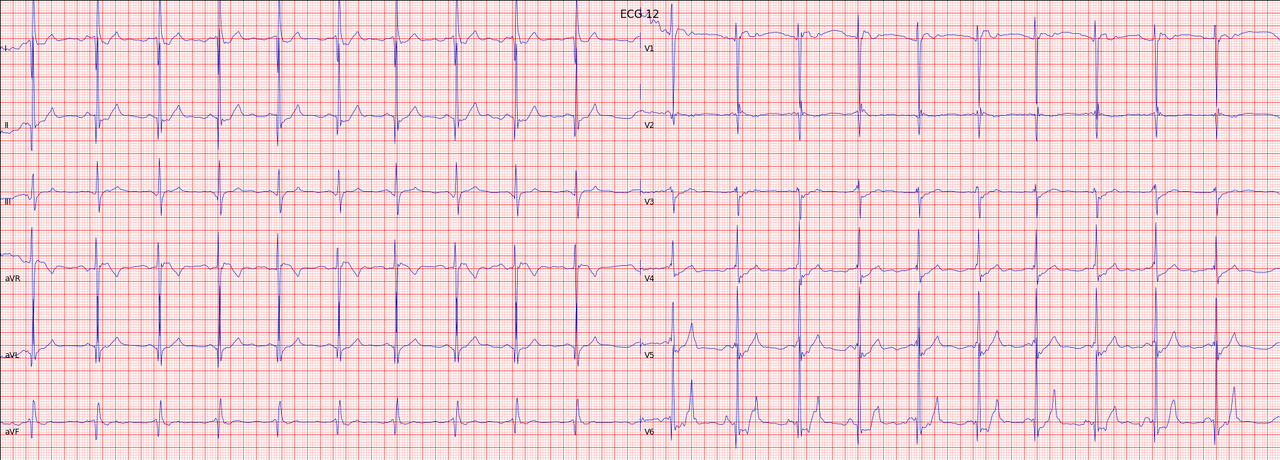
可视化展示
import ecg_plot
ecg_plot.plot(gen_ecg12, sample_rate=fs, title='ECG 12')
ecg_plot.show()
PPGFlowECG接口
POST /api/v1/experimental/ppgFlowEcg
通过输入单导联信号可以生成十二导联信号。
请求参数
| 参数 | 类型 | 必填 | 说明 |
|---|---|---|---|
| ppgData | array | ✅ | PPG信号数据数组。上传红光、绿光或者红外光数据 |
| ppgSampleRate | number | ✅ | 采样率,单位Hz(推荐250-500) |
请求示例
curl -X POST "https://api.heartvoice.com.cn/api/v1/experimental/ppgFlowEcg" \
  -H "Authorization: Bearer YOUR_API_KEY" \
  -H "Content-Type: application/json" \
  -d '{
    "ppgData": [512, 515, 520, 518, 525, ...],
    "ecgSampleRate": 500
  }'
响应示例
{
  "errorCode": "0",
  "msg": "成功",
  "data": [
    [
      -0.0005600000149570405,
      0.05680999904870987,
      -0.002580000087618828,
      0.02824000082910061,
      ...
      ]
    ]
}
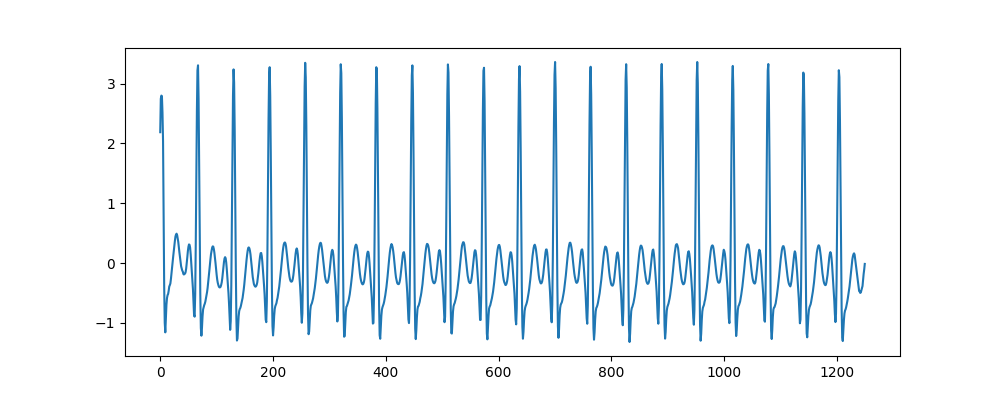
可视化展示
文献
@article{fang2025ppgflowecg,
  title={PPGFlowECG: Latent Rectified Flow with Cross-Modal Encoding for PPG-Guided ECG Generation and Cardiovascular Disease Detection},
  author={Fang, Xiaocheng and Jin, Jiarui and Wang, Haoyu and Liu, Che and Cai, Jieyi and Nie, Guangkun and Li, Jun and Li, Hongyan and Hong, Shenda},
  journal={arXiv preprint arXiv:2509.19774},
  year={2025}
}
Fang, X., Jin, J., Wang, H., Liu, C., Cai, J., Nie, G., ... & Hong, S. (2025). PPGFlowECG: Latent Rectified Flow with Cross-Modal Encoding for PPG-Guided ECG Generation and Cardiovascular Disease Detection. arXiv preprint arXiv:2509.19774.
ECHOPulse接口
POST /api/v1/experimental/ecgEcho
通过输入单导联信号可以生成十二导联信号。
请求参数
| 参数 | 类型 | 必填 | 说明 |
|---|---|---|---|
| ecgData | array | ✅ | ECG信号数据数组(ADC值) |
| ecgSampleRate | number | ✅ | 采样率,单位Hz(推荐250-500) |
请求示例
curl -X POST "https://api.heartvoice.com.cn/api/v1/experimental/ecgEcho" \
  -H "Authorization: Bearer YOUR_API_KEY" \
  -H "Content-Type: application/json" \
  -d '{
    "ecgData": [512, 515, 520, 518, 525, ...],
    "ecgSampleRate": 500
  }'
响应示例
{
  "errorCode": "0",
  "msg": "成功",
  "data": {
    "ecgEcho": [
      [
        [
          [
            [
              0.0013988255523145199,
              0.004246973432600498,
              0.0010940954089164734,
              0.004930938594043255,
              -0.0024434151127934456,
              0.00477356743067503,
              ...
            ]
          ]
        ]
      ]
    ]
  }
}
可视化展示
保存ECHO的视频帧
def save_video_and_plot_frames(video_tensor, save_dir='output'):
    os.makedirs(save_dir, exist_ok=True)
    T = video_tensor.shape[2]  # 时间维度
    fig, axes = plt.subplots(1, T, figsize=(T * 3, 3))

    for t in range(T):
        # 取出第 t 帧
        frame = video_tensor[0, :, t, :, :]  # [C, H, W]

        # 转成 [H, W, C] numpy
        frame_np = frame.permute(1, 2, 0).cpu().numpy()

        # 归一化到 [0,1] 避免 imshow clipping
        frame_min, frame_max = frame_np.min(), frame_np.max()
        if frame_max > frame_min:
            frame_np = (frame_np - frame_min) / (frame_max - frame_min)
        else:
            frame_np = np.zeros_like(frame_np)  # 防止除零

        ax = axes[t]
        ax.imshow(frame_np)
        ax.set_title(f'Frame {t}')
        ax.axis('off')

    for i in range(T, len(axes)):
        axes[i].axis('off')

    plt.tight_layout()
    plt.savefig(os.path.join(save_dir, 'echo_frames.png'))
    plt.show()
    plt.close()

    print(f"All frames plotted in {save_dir}")
保存结果为gif
def video_tensor_to_gif_with_ecg(video_tensor, ecg_data, output_path, title, duration=125, fps=8):
    # 将视频内容转换成numpy阵列
    video_np = np.array(video_tensor)
    video_np = np.squeeze(video_np, axis=0)
    # 改变维度顺序 (C, T, H, W) -> (T, H, W, C)
    video_np = np.transpose(video_np, (1, 2, 3, 0))

    # EKG 数据准备(缩小维度)
    ecg = np.array(ecg_data)
    ecg = ecg[0, 1, :]  # Assuming this is the correct dimension for EKG data

    # 确认帧数
    num_frames = 11
    # EKG 数据根据帧数重新抽样
    x_original = np.linspace(0, 1, len(ecg))
    x_resampled = np.linspace(0, 1, num_frames)
    ecg_resampled = np.interp(x_resampled, x_original, ecg)

    # 设定画布
    fig, (ax1, ax2) = plt.subplots(2, 1, figsize=(8, 10), gridspec_kw={'height_ratios': [3, 1]})

    # 设置初始化图像
    im = ax1.imshow(np.zeros((128, 128, 3)), animated=True)
    ax1.set_title(title)
    line, = ax2.plot([], [], 'r-')

    ax1.axis('off')
    ax2.set_xlim(0, num_frames)
    ax2.set_ylim(ecg_resampled.min(), ecg_resampled.max())
    ax2.set_xlabel('Frame')
    ax2.set_ylabel('EKG')
    ax2.set_title('Lead I EKG')

    def update(frame):
        im.set_array(video_np[frame])
        line.set_data(range(frame + 1), ecg_resampled[:frame + 1])
        return im, line

    num_frames = video_np.shape[0]
    anim = FuncAnimation(fig, update, frames=num_frames, interval=duration, blit=True)

    anim.save(output_path, writer='pillow', fps=fps)
    plt.close(fig)

    print(f"GIF saved to {output_path}")
可视化展示
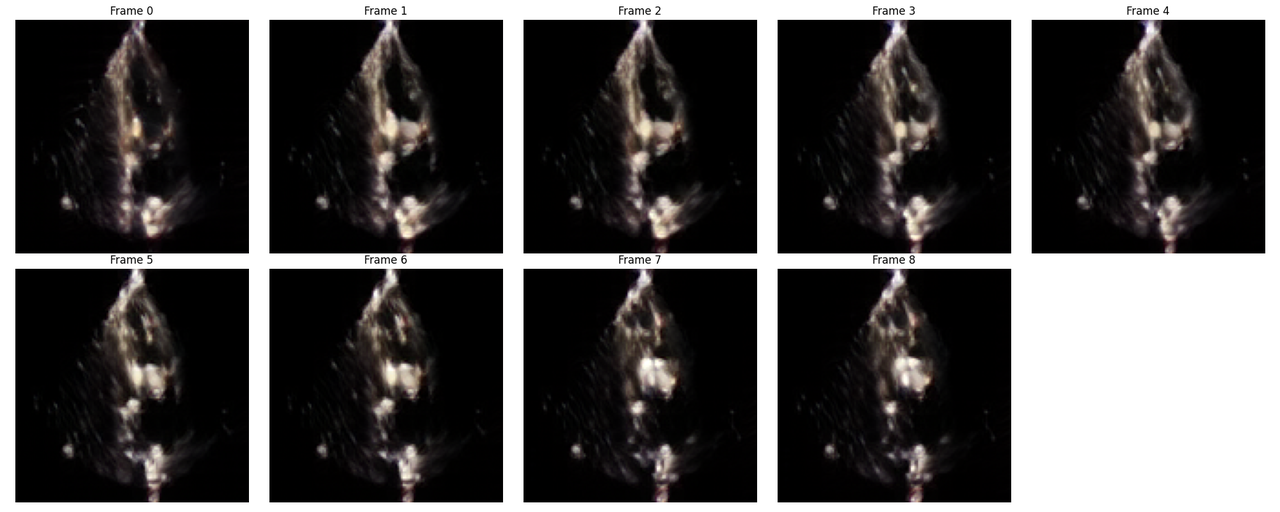
- 生成的ECHO帧(调用save_video_and_plot_frames)
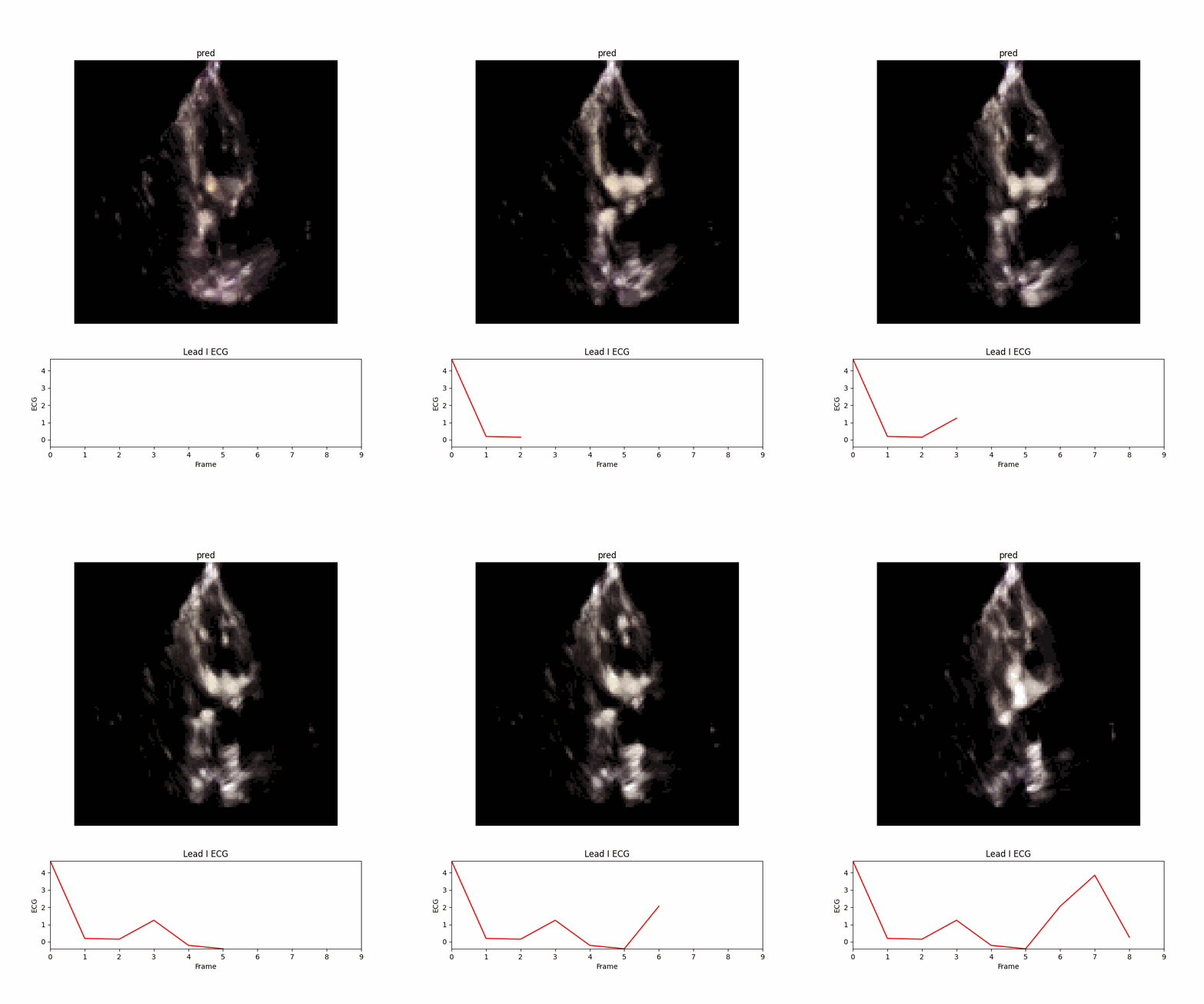
- 转成gif(调用video_tensor_to_gif_with_ecg)
文献
@article{li2024echopulse,
  title={Echopulse: Ecg controlled echocardio-grams video generation},
  author={Li, Yiwei and Kim, Sekeun and Wu, Zihao and Jiang, Hanqi and Pan, Yi and Jin, Pengfei and Song, Sifan and Shi, Yucheng and Liu, Tianming and Li, Quanzheng and others},
  journal={arXiv preprint arXiv:2410.03143},
  year={2024}
}
Li, Y., Kim, S., Wu, Z., Jiang, H., Pan, Y., Jin, P., ... & Li, X. (2024). Echopulse: Ecg controlled echocardio-grams video generation. arXiv preprint arXiv:2410.03143.
ECGTwins接口
POST /api/v1/experimental/ecgTwins
通过输入单导联信号可以生成十二导联信号。
请求参数
| 参数 | 类型 | 必填 | 说明 |
|---|---|---|---|
| reference_file | file | ✅ | 参考文件,目前是固定的 示例文件 |
| text | str | ✅ | 临床诊断文本,多个诊断需要用'|'分隔开 |
| age | int | ✅ | 年龄 |
| sex | str | ✅ | 性别 |
| hr | int | ✅ | 心率 |
| batch | int | ❌ | 选择生成ECG的数量 |
请求示例
curl -X POST "https://api.heartvoice.com.cn/api/v1/experimental/diffuSets" \
  -H "Authorization: Bearer YOUR_API_KEY" \
  -H "Content-Type: application/json" \
  -F "file=@normal_1-66b62bfc8acabc11cf5cc34cafe860f4.pt"
  -d '{
    "text": 'Sinus rhythm|Normal ECG.',  # Clinical text report, multi-reports should be split by '|'
    "age": 50,  # Age of patient
    "sex": 'M',
    "hr": 80,
    'batch': 1
  }'
响应示例
{
  "errorCode": "0",
  "msg": "成功",
  "data": {
    "ECGTwin_imgs": [
        [
          0.0013988255523145199,
          0.004246973432600498,
          0.0010940954089164734,
          0.004930938594043255,
          -0.0024434151127934456,
          0.00477356743067503,
          ...
        ]
    ]
  }
}
可视化展示
import requests
import json
import base64
import io
from PIL import Image

def base64_to_image(base64_str):
    # 解码Base64字符串
    image_data = base64.b64decode(base64_str)
    # 使用io.BytesIO将解码后的数据转换为文件对象
    image_file = io.BytesIO(image_data)
    # 使用PIL打开图片
    image = Image.open(image_file)
    return image

ecg_img = base64_to_image(ecg_data)
ecg_img.show()
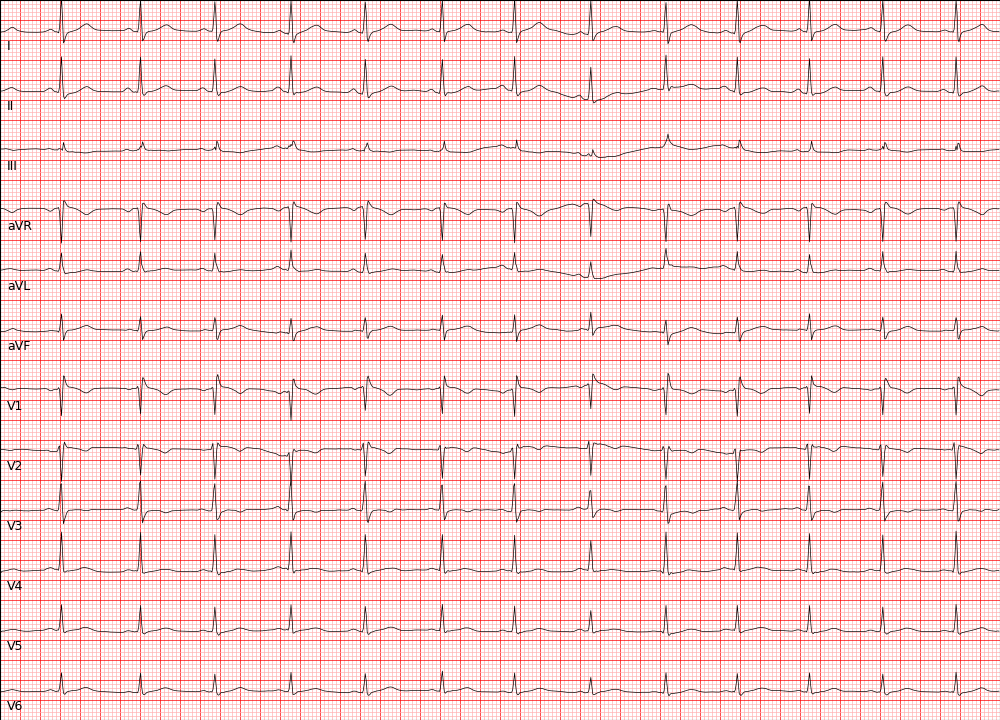
文献
@article{lai2025ecgtwin,
  title={ECGTwin: Personalized ECG Generation Using Controllable Diffusion Model},
  author={Lai, Yongfan and Liu, Bo and Guan, Xinyan and Zhao, Qinghao and Li, Hongyan and Hong, Shenda},
  journal={arXiv preprint arXiv:2508.02720},
  year={2025}
}
Lai, Y., Liu, B., Guan, X., Zhao, Q., Li, H., & Hong, S. (2025). ECGTwin: Personalized ECG Generation Using Controllable Diffusion Model. arXiv preprint arXiv:2508.02720.
ECGFounder接口
POST /api/v1/experimental/ecgFounder
通过输入单导联信号可以生成十二导联信号。
请求参数
| 参数 | 类型 | 必填 | 说明 |
|---|---|---|---|
| ecgData | array | ✅ | ECG信号数据数组(ADC值) |
| ecgSampleRate | number | ✅ | 采样率,单位Hz(推荐250-500) |
请求示例
curl -X POST "https://api.heartvoice.com.cn/api/v1/experimental/ecgFounder" \
  -H "Authorization: Bearer YOUR_API_KEY" \
  -H "Content-Type: application/json" \
  -d '{
    "ecgData": [512, 515, 520, 518, 525, ...],
    "ecgSampleRate": 500
  }'
响应示例
{
  "errorCode": "0",
  "msg": "成功",
  "data": {
    "otherwise_normal_ecg": null,
    "rsr_OR_QR_PATTERN_IN_V1_SUGGESTS_RIGHT_VENTRICULAR_CONDUCTION_DELAY": null,
    "nonspecific_T_WAVE_ABNORMALITY_HAS_REPLACED_INVERTED_T_WAVES_IN": null,
    "inverted_T_WAVES_HAVE_REPLACED_NON_SPECIFIC_T_WAVE_ABNORMALITY_IN": null,
    "voltage_CRITERIA_FOR_LEFT_VENTRICULAR_HYPERTROPHY": null,
    "bifascicular_BLOCK": null,
    ...
  }
}
中英文对照
| 英文标签 | 中文翻译 |
|---|---|
| ABNORMAL ECG | 异常心电图 |
| NORMAL SINUS RHYTHM | 正常窦性心律 |
| NORMAL ECG | 正常心电图 |
| SINUS RHYTHM | 窦性心律 |
| SINUS BRADYCARDIA | 窦性心动过缓 |
| ATRIAL FIBRILLATION | 心房颤动 |
| SINUS TACHYCARDIA | 窦性心动过速 |
| otherwise normal ecg | 其他方面正常的心电图 |
| LEFT AXIS DEVIATION | 左轴偏移 |
| PREMATURE VENTRICULAR COMPLEXES | 室性早搏 |
| BORDERLINE ECG | 临界心电图 |
| RIGHT BUNDLE BRANCH BLOCK | 右束支传导阻滞 |
| SEPTAL INFARCT | 室间隔梗死 |
| LEFT ATRIAL ENLARGEMENT | 左心房扩大 |
| NONSPECIFIC T WAVE ABNORMALITY | 非特异性 T 波异常 |
| LOW VOLTAGE QRS | 低电压 QRS 波群 |
| PREMATURE ATRIAL COMPLEXES | 房性早搏 |
| ANTERIOR INFARCT | 前壁梗死 |
| INCOMPLETE RIGHT BUNDLE BRANCH BLOCK | 不完全性右束支传导阻滞 |
| PREMATURE SUPRAVENTRICULAR COMPLEXES | 上室性早搏 |
| LEFT BUNDLE BRANCH BLOCK | 左束支传导阻滞 |
| NONSPECIFIC T WAVE ABNORMALITY NOW EVIDENT IN | 当前出现非特异性 T 波异常 |
| NONSPECIFIC T WAVE ABNORMALITY NO LONGER EVIDENT IN | 非特异性 T 波异常已消失 |
| T WAVE INVERSION NOW EVIDENT IN | 当前出现 T 波倒置 |
| LATERAL INFARCT | 侧壁梗死 |
| NONSPECIFIC ST ABNORMALITY | 非特异性 ST 段异常 |
| LEFT VENTRICULAR HYPERTROPHY | 左心室肥大 |
| T WAVE INVERSION NO LONGER EVIDENT IN | T 波倒置已消失 |
| WITH RAPID VENTRICULAR RESPONSE | 伴快速心室反应 |
| QT HAS SHORTENED | QT 间期缩短 |
| QT HAS LENGTHENED | QT 间期延长 |
| FUSION COMPLEXES | 融合波 |
| ATRIAL FLUTTER | 心房扑动 |
| MARKED SINUS BRADYCARDIA | 明显窦性心动过缓 |
| WITH SINUS ARRHYTHMIA | 伴窦性心律不齐 |
| NONSPECIFIC ST AND T WAVE ABNORMALITY | 非特异性 ST-T 波异常 |
| LEFT ANTERIOR FASCICULAR BLOCK | 左前分支传导阻滞 |
| RIGHT AXIS DEVIATION | 右轴偏移 |
| ECTOPIC ATRIAL RHYTHM | 异位房性心律 |
| UNDETERMINED RHYTHM | 未定型心律 |
| ANTEROSEPTAL INFARCT | 前间隔梗死 |
| RIGHTWARD AXIS | 右偏心电轴 |
| ST NOW DEPRESSED IN | 当前出现 ST 段压低 |
| WITH SHORT PR | 伴短 PR 间期 |
| WITH MARKED SINUS ARRHYTHMIA | 伴明显窦性心律不齐 |
| ST NO LONGER DEPRESSED IN | ST 段压低已消失 |
| INVERTED T WAVES HAVE REPLACED NONSPECIFIC T WAVE ABNORMALITY IN | T 波倒置取代了非特异性 T 波异常 |
| NON-SPECIFIC CHANGE IN ST SEGMENT IN | ST 段非特异性改变 |
| NONSPECIFIC T WAVE ABNORMALITY HAS REPLACED INVERTED T WAVES IN | 非特异性 T 波异常取代了倒置 T 波 |
| JUNCTIONAL RHYTHM | 交界性心律 |
| ELECTRONIC ATRIAL PACEMAKER | 电子房起搏器 |
| ABERRANT CONDUCTION | 异常传导 |
| ELECTRONIC VENTRICULAR PACEMAKER | 电子心室起搏器 |
| T WAVE INVERSION LESS EVIDENT IN | T 波倒置减轻 |
| ANTEROLATERAL INFARCT | 前外侧梗死 |
| WITH REPOLARIZATION ABNORMALITY | 伴复极异常 |
| RSR' OR QR PATTERN IN V1 SUGGESTS RIGHT VENTRICULAR CONDUCTION DELAY | V1 导联 RSR' 或 QR 波形提示右心室传导延迟 |
| T WAVE INVERSION MORE EVIDENT IN | T 波倒置更加明显 |
| WIDE QRS RHYTHM | 宽 QRS 波群心律 |
| WITH PREMATURE VENTRICULAR OR ABERRANTLY CONDUCTED COMPLEXES | 伴室性早搏或异常传导复合波 |
| RIGHT ATRIAL ENLARGEMENT | 右心房扩大 |
| INFERIOR INFARCT | 下壁梗死 |
| INCOMPLETE LEFT BUNDLE BRANCH BLOCK | 不完全性左束支传导阻滞 |
| VOLTAGE CRITERIA FOR LEFT VENTRICULAR HYPERTROPHY | 左心室肥大的电压标准 |
| OR DIGITALIS EFFECT | 或洋地黄效应 |
| BIFASCICULAR BLOCK | 双分支传导阻滞 |
| ST NO LONGER ELEVATED IN | ST 段抬高已消失 |
| WITH SLOW VENTRICULAR RESPONSE | 伴缓慢心室反应 |
| ST ELEVATION NOW PRESENT IN | 当前出现 ST 段抬高 |
| PREMATURE ECTOPIC COMPLEXES | 早期异位复合波 |
| LEFT POSTERIOR FASCICULAR BLOCK | 左后分支传导阻滞 |
| T WAVE AMPLITUDE HAS DECREASED IN | T 波振幅降低 |
| WITH A COMPETING JUNCTIONAL PACEMAKER | 伴竞争性交界性起搏 |
| RIGHT SUPERIOR AXIS DEVIATION | 右上轴偏移 |
| BIATRIAL ENLARGEMENT | 双心房扩大 |
| VENTRICULAR-PACED RHYTHM | 心室起搏心律 |
| ATRIAL-PACED RHYTHM | 房起搏心律 |
| T WAVE AMPLITUDE HAS INCREASED IN | T 波振幅增高 |
| WITH QRS WIDENING | 伴 QRS 波群增宽 |
| WITH 1ST DEGREE AV BLOCK | 伴一度房室传导阻滞 |
| PROLONGED QT | QT 间期延长 |
| WITH PROLONGED AV CONDUCTION | 伴房室传导延迟 |
| RIGHT VENTRICULAR HYPERTROPHY | 右心室肥大 |
| WITH QRS WIDENING AND REPOLARIZATION ABNORMALITY | 伴 QRS 波群增宽及复极异常 |
| ATRIAL-SENSED VENTRICULAR-PACED RHYTHM | 房感知-心室起搏心律 |
| AV SEQUENTIAL OR DUAL CHAMBER ELECTRONIC PACEMAKER | 房室顺序或双腔电子起搏器 |
| PULMONARY DISEASE PATTERN | 肺型心电图 |
| ACUTE MI / STEMI | 急性心肌梗死 / ST 段抬高型心梗 |
| INFERIOR-POSTERIOR INFARCT | 下后壁梗死 |
| NONSPECIFIC INTRAVENTRICULAR CONDUCTION DELAY | 非特异性心室内传导延迟 |
| PREMATURE VENTRICULAR AND FUSION COMPLEXES | 室性早搏及融合波 |
| IN A PATTERN OF BIGEMINY | 二联律模式 |
| AV DUAL-PACED RHYTHM | 双腔起搏心律 |
| SUPRAVENTRICULAR TACHYCARDIA | 上室性心动过速 |
| VENTRICULAR-PACED COMPLEXES | 心室起搏复合波 |
| WIDE QRS TACHYCARDIA | 宽 QRS 心动过速 |
| RSR' PATTERN IN V1 | V1 导联 RSR' 波形 |
| ST LESS DEPRESSED IN | ST 段压低减轻 |
| VENTRICULAR TACHYCARDIA | 心室性心动过速 |
| EARLY REPOLARIZATION | 早复极 |
| ST MORE DEPRESSED IN | ST 段压低加重 |
| ANTEROLATERAL LEADS | 前外侧导联 |
| ELECTRONIC DEMAND PACING | 电子按需起搏 |
| RBBB AND LEFT ANTERIOR FASCICULAR BLOCK | 右束支阻滞伴左前分支阻滞 |
| LATERAL INJURY PATTERN | 侧壁损伤图形 |
| BIVENTRICULAR PACEMAKER DETECTED | 检测到双心室起搏器 |
| SUSPECT UNSPECIFIED PACEMAKER FAILURE | 疑似未明确的起搏器功能障碍 |
| WOLFF-PARKINSON-WHITE | 预激综合征(Wolff-Parkinson-White 综合征) |
| WITH VENTRICULAR ESCAPE COMPLEXES | 伴心室逸搏复合波 |
| INFERIOR INJURY PATTERN | 下壁损伤图形 |
| CONSIDER RIGHT VENTRICULAR INVOLVEMENT IN ACUTE INFERIOR INFARCT | 急性下壁心梗伴右室受累可能 |
| ST ELEVATION HAS REPLACED ST DEPRESSION IN | ST 段抬高取代 ST 段压低 |
| NONSPECIFIC INTRAVENTRICULAR BLOCK | 非特异性室内传导阻滞 |
| MASKED BY FASCICULAR BLOCK | 被分支阻滞掩盖 |
| PEDIATRIC ECG ANALYSIS | 儿科心电图分析 |
| BLOCKED | 阻滞 |
| WITH UNDETERMINED RHYTHM IRREGULARITY | 伴不确定心律不齐 |
| LEFTWARD AXIS | 左偏电轴 |
| WITH 2ND DEGREE SA BLOCK MOBITZ I | 伴二度窦房阻滞 Mobitz I 型 |
| ACUTE | 急性 |
| ABNORMAL LEFT AXIS DEVIATION | 异常左轴偏移 |
| WITH COMPLETE HEART BLOCK | 伴完全性房室传导阻滞 |
| NO P-WAVES FOUND | 未检测到 P 波 |
| ST LESS ELEVATED IN | ST 段抬高减轻 |
| WITH RETROGRADE CONDUCTION | 伴逆向传导 |
| ST MORE ELEVATED IN | ST 段抬高加重 |
| JUNCTIONAL BRADYCARDIA | 交界性心动过缓 |
| WITH VARIABLE AV BLOCK | 伴变异性房室传导阻滞 |
| ANTERIOR INJURY PATTERN | 前壁损伤图形 |
| WITH JUNCTIONAL ESCAPE COMPLEXES | 伴交界性逸搏复合波 |
| ACUTE MI | 急性心肌梗死 |
| ACUTE PERICARDITIS | 急性心包炎 |
| POSTERIOR INFARCT | 后壁梗死 |
| IDIOVENTRICULAR RHYTHM | 特发性心室心律 |
| WITH 2ND DEGREE SA BLOCK MOBITZ II | 伴二度窦房阻滞 Mobitz II 型 |
| R IN AVL | AVL 导联 R 波 |
| SINUS/ATRIAL CAPTURE | 窦性/房性捕获 |
| AV DUAL-PACED COMPLEXES | 双腔起搏复合波 |
| INFEROLATERAL INJURY PATTERN | 下外侧损伤图形 |
| RBBB AND LEFT POSTERIOR FASCICULAR BLOCK | 右束支阻滞伴左后分支阻滞 |
| ANTEROLATERAL INJURY PATTERN | 前外侧损伤图形 |
| ATRIAL-PACED COMPLEXES | 房起搏复合波 |
| WITH SINUS PAUSE | 伴窦性停搏 |
| BIVENTRICULAR HYPERTROPHY | 双心室肥大 |
| ABNORMAL RIGHT AXIS DEVIATION | 异常右轴偏移 |
| SUPRAVENTRICULAR COMPLEXES | 上室性复合波 |
| WITH 2ND DEGREE AV BLOCK MOBITZ I | 伴二度房室传导阻滞 Mobitz I 型 |
| WITH 2:1 AV CONDUCTION | 伴 2:1 房室传导 |
| WITH AV DISSOCIATION | 伴房室分离 |
| MULTIFOCAL ATRIAL TACHYCARDIA | 多源性房性心动过速 |
文献
@article{li2025electrocardiogram,
  title={An Electrocardiogram Foundation Model Built on over 10 Million Recordings},
  author={Li, Jun and Aguirre, Aaron D and Junior, Valdery Moura and Jin, Jiarui and Liu, Che and Zhong, Lanhai and Sun, Chenxi and Clifford, Gari and Brandon Westover, M and Hong, Shenda},
  journal={NEJM AI},
  volume={2},
  number={7},
  pages={AIoa2401033},
  year={2025},
  publisher={Massachusetts Medical Society}
}
Li, J., Aguirre, A., Moura, J., Liu, C., Zhong, L., Sun, C., ... & Hong, S. (2024). An electrocardiogram foundation model built on over 10 million recordings with external evaluation across multiple domains. arXiv preprint arXiv:2410.04133.